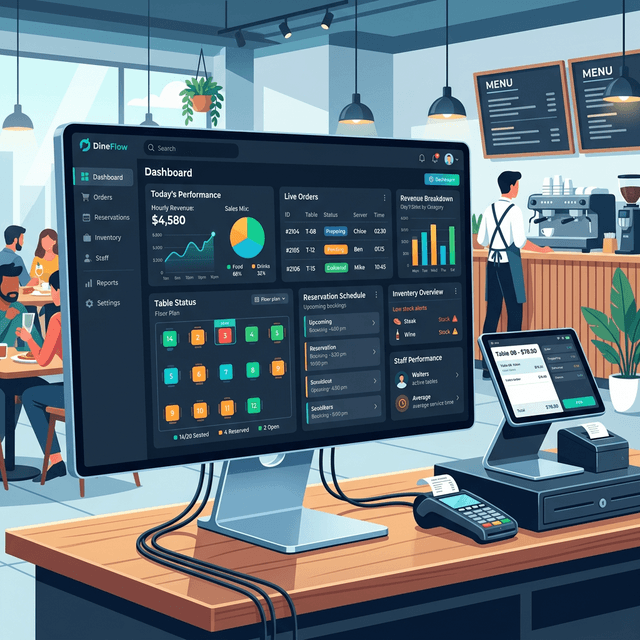
In modern restaurants, billing is no longer limited to printing a receipt. Billing systems now handle orders, payments, taxes, menu management, and operational reporting.
Restaurant billing software is the system restaurants use to generate invoices, manage customer orders, calculate taxes, and process payments. Modern restaurant billing software also connects with kitchen systems, QR ordering platforms, and accounting tools to manage daily restaurant operations efficiently.
Restaurants rely on billing systems to reduce manual errors, improve order accuracy, speed up checkout, and maintain clear financial records.
This guide explains what restaurant billing software is, how it works, how it compares to POS and ERP systems, and how restaurants choose the right billing system.
What is Restaurant Billing?
Restaurant billing is the complete process of generating a customer invoice, calculating applicable taxes, and securely processing the final payment for food and services rendered at a restaurant. In modern hospitality, this process goes far beyond a simple cash register receipt.
Specifically, what is restaurant billing in today's digital age? It is an automated workflow where a customer's order is instantly sent from a waiter's device or QR menu to the kitchen, tracked in real-time, and converted into a final check that includes all items, local taxes (like GST), discounts, and service charges. Once the bill is presented and paid—via cash, card, or UPI—the restaurant billing software zeroes out the table and logs the revenue into the restaurant's central accounting system. This seamless cycle eliminates calculation errors, speeds up table turnover, and provides owners with clear financial visibility.
In most restaurants, the billing system acts as the operational center connecting:
- Order entry
- Kitchen preparation
- Payment processing
- Sales reporting
Instead of writing orders manually and calculating totals at the counter, staff enter orders into the billing system, which automatically calculates totals, taxes, and discounts. The system then generates the final bill and records the transaction.
Modern billing software often integrates with other restaurant technologies such as:
- Kitchen display systems
- QR ordering platforms
- Payment gateways
- Inventory management tools
- Accounting software
Because of these integrations, restaurant billing software now supports not only billing but also broader operational management.
How Restaurant Billing Systems Work
A restaurant billing system manages the full lifecycle of a customer order, from order placement to payment completion. The process typically follows these steps.
Order Entry
The process begins when a server, cashier, or customer places an order. Orders can be entered through:
- Billing terminals
- Handheld tablets
- POS devices
- QR code ordering systems
The system records the items ordered, modifiers, quantities, and table number.
Order Routing
Once the order is entered, the system sends the order details to the kitchen. This may happen through:
- Kitchen display systems
- Kitchen printers
- Station-specific displays
For example: drinks may go to the bar station, grilled items to the grill station, and desserts to the dessert counter. This automated routing improves order accuracy and preparation speed.
Bill Generation
When the customer requests the bill, the billing system consolidates all ordered items for that table or order. The software automatically calculates:
- Item totals
- Applicable taxes
- Service charges
- Discounts or promotions
The result is an itemized invoice ready for payment. Check out our guide on automated tax calculations for GST compliance.
Payment Processing
Modern restaurant billing software supports multiple payment methods. These usually include:
- Cash payments
- Debit cards
- Credit cards
- Digital wallets
- UPI payments
- QR payments
Many restaurants allow split payments, where customers pay using multiple payment methods.
Reporting and Records
After payment is completed, the system records the transaction in the restaurant’s sales database. This data becomes available for reporting, including:
- Daily revenue
- Item sales
- Peak hours
- Staff performance
- Tax summaries
Managers can review this information to make operational decisions.
Types of Restaurants That Use Billing Software
Nearly all types of modern food and beverage businesses rely on billing software, but they use it in different ways. Some examples include:
- Quick Service Restaurants (QSRs): Rely on fast order entry, integrated kitchen displays, and high-speed receipt printing to handle large volumes.
- Fine Dining Restaurants: Use billing systems for complex table management, course tracking, and managing split bills.
- Cloud Kitchens: Need billing software that integrates directly with delivery aggregators.
- Cafes and Bakeries: Focus on quick payments, loyalty programs, and fast checkout for takeaway items.
- Food Trucks: Usually rely on mobile or tablet-based cloud billing systems that run on unstable internet connections.
Restaurant Billing Software vs Cash Registers
Before digital billing software, restaurants used electronic cash registers (ECRs) to ring up sales. Today, cash registers are largely obsolete for growing businesses.
A traditional cash register only records the final sale amount and holds cash. It provides no information on what was sold, who sold it, or what inventory was used.
In contrast, modern billing software records every detail of the transaction. When a customer orders, the software knows the exact item, applies the correct tax rate, deducts the ingredients from inventory, and records which server handled the table.
Restaurant Billing Software vs POS Systems
The terms restaurant billing software and POS system are often used interchangeably. However, historically they had slightly different meanings. You can also explore our in-depth comparison here.
Restaurant Billing Software
Billing software traditionally focused on the financial side of transactions. Its core functions included:
- Generating invoices
- Calculating taxes
- Processing payments
- Recording sales
POS Systems
A POS system (Point of Sale system) is a broader operational platform. It typically includes:
- Billing functionality
- Inventory management
- Customer management
- Employee tracking
- Analytics and reporting
Modern Industry Reality
In modern restaurants, billing software usually includes POS capabilities. This means that most restaurant billing systems today provide:
- Order management
- Billing
- Payment processing
- Inventory tracking
- Reporting dashboards
Because of this overlap, many restaurants use the terms interchangeably.
Restaurant Billing Software vs ERP Systems
Restaurant billing systems and ERP systems serve different operational levels.
Restaurant Billing Software
Billing systems focus on daily restaurant operations. Typical functions include:
- Taking orders
- Generating bills
- Processing payments
- Tracking daily sales
- Managing menus
These systems are used by cashiers, servers, and restaurant managers.
ERP Systems
ERP systems (Enterprise Resource Planning systems) manage company-wide business operations. Restaurant ERP platforms often include:
- Supply chain management
- Multi-location financial accounting
- Payroll systems
- Vendor management
- Procurement tracking
ERP systems are usually used by corporate executives, financial managers, and operations teams.
Key Differences
| Feature | Restaurant Billing Software | ERP System |
|---|---|---|
| Primary users | Restaurant staff | Corporate teams |
| Scope | Daily operations | Enterprise management |
| Data scale | Single restaurant | Multi-location operations |
| Complexity | Simple interface | Complex business tools |
Large restaurant chains often use both systems together.
Benefits of Restaurant Billing Software
Implementing a modern billing system provides immediate operational advantages for restaurants of all sizes. The primary benefits include:
- Faster Checkout: Automated calculations and integrated payment gateways speed up the payment process, reducing wait times for customers.
- Reduced Billing Errors: System-calculated totals eliminate manual math mistakes, ensuring accurate bills and preventing revenue leakage.
- Real-Time Sales Insights: Managers can view up-to-the-minute data on revenue, top-selling items, and peak hours to make informed decisions.
- Better Inventory Control: When integrated with inventory, the system automatically tracks ingredient usage, helping to reduce food waste and control costs.
- Improved Customer Experience: Faster service, accurate bills, and options like QR ordering or split payments lead to higher customer satisfaction.
Key Features of Modern Restaurant Billing Software
Modern restaurant billing platforms include features that extend beyond basic billing. Common features include the following.
Menu Management
Restaurants can update menus digitally through the billing system. This allows staff to:
- Change prices
- Add new menu items
- Create modifiers such as "extra cheese" or "no onions" (learn more about addons)
Menu updates can be applied instantly across all billing terminals.
Inventory Tracking
Some billing systems connect menu items to ingredient inventories. When a dish is sold, the system deducts ingredients automatically from inventory records. This helps restaurants track:
- Ingredient usage
- Stock levels
- Purchasing requirements
Table Management
Restaurants with table service use billing software to manage floor plans. The system tracks:
- Occupied tables
- Active orders
- Payment status
- Table turnover times
This helps restaurants improve seating efficiency.
Reporting and Analytics
Billing systems generate detailed sales reports. Managers can analyze:
- Best-selling items
- Peak business hours
- Revenue trends
- Staff performance
These reports help restaurants make data-driven decisions.
Integration with Other Systems
Modern restaurant billing software often integrates with additional tools such as:
- Accounting software (like Zoho Books)
- Delivery platforms
- Marketing tools
- Customer loyalty programs
Integration allows restaurants to centralize their operational data.
Cloud Billing vs Traditional Billing Systems
Restaurant billing software can be deployed using different technical architectures. The two most common approaches are traditional on-premise systems and cloud-based systems.
Traditional On-Premise Billing
Traditional systems run on local servers installed inside the restaurant. Advantages include full control over local data and minimal internet dependency.
However, these systems often require expensive hardware, manual updates, and local maintenance. Hardware failures can also lead to operational downtime.
Cloud-Based Billing Systems
Cloud billing systems are hosted on remote servers and accessed through internet-connected devices. Restaurants typically use tablets, computers, or POS terminals to access the system.
Advantages include automatic software updates, remote access to reports, easier scalability, and lower upfront costs. Because of these benefits, most modern restaurants now prefer cloud-based billing solutions.
Benefits of Cloud Billing Systems
There are several reasons why the shift to cloud technology is accelerating in the hospitality industry:
- Remote Access: Owners can check live sales data and reports from anywhere using their smartphone.
- Data Security: If a local device breaks or is stolen, no data is lost because everything is backed up in the cloud.
- Automatic Backups: Cloud systems prevent the loss of critical financial records needed for tax compliance.
- Continuous Innovation: Providers push new features automatically without requiring restaurants to buy new software versions.
QR Ordering and Billing Integration
QR code ordering systems are increasingly integrated with restaurant billing software.
In this setup, customers scan a QR code placed on their table. The QR code opens a digital menu connected to the restaurant’s billing system. Customers can then:
- Browse menu items
- Place orders
- Customize dishes
- View their bill
Orders placed through QR systems are automatically recorded in the billing system and sent to the kitchen. Many QR ordering systems also support direct payments, allowing customers to pay their bill without waiting for staff.
This integration improves service speed and reduces staff workload. Restaurants using QR ordering often see faster table turnover and improved order accuracy.
Common Billing Mistakes Restaurants Make
Even with modern software, restaurants sometimes face operational issues due to incorrect system setup. Common mistakes include the following.
Incorrect Menu Configuration
If menu items and modifiers are not configured correctly, the system may produce inaccurate orders or inventory records.
Incorrect Tax Settings
Restaurants must configure tax rules correctly for each item category. Incorrect tax settings can lead to compliance issues and accounting discrepancies.
Ignoring Reporting Data
Many restaurants use billing software only for transactions but ignore the reporting features. Sales analytics can reveal valuable insights about menu performance and customer behavior.
Lack of Staff Training
Staff must understand how to split bills, apply discounts, process refunds, and close tables correctly. Without proper training, billing errors and customer delays can occur.
Ready to upgrade your billing system?
Switch to Epitto's cloud-based billing and ERP platform.
Start Your Free Trialarrow_forwardChoosing the Right Restaurant Billing Software
Restaurants should evaluate several factors before selecting a billing system. Important considerations include:
Business Model
Different restaurants have different operational needs. For example:
- Quick service restaurants require fast order entry
- Cafes need simple menu modifiers
- Fine dining restaurants require table and course management
Hardware Compatibility
Restaurants should confirm whether the software supports common POS hardware such as billing terminals, receipt printers, barcode scanners, and payment terminals.
Integration Support
A good billing system should integrate with important business tools including accounting software, payment gateways, and online ordering platforms.
Reliability and Support
Restaurants rely on billing systems during busy service hours. Reliable customer support and system stability are essential.
Scalability
Restaurants planning to expand should select software capable of supporting multiple locations and higher transaction volumes.
Example of a Modern Restaurant Billing Platform
Epitto is a cloud-based restaurant management platform that combines billing, POS, QR ordering, and ERP-level reporting.
Platforms like this allow restaurants to manage billing, menu items, orders, and operational data through a single system. Instead of using separate tools for billing, QR ordering, and reporting, integrated platforms combine these capabilities into a unified environment.
This approach simplifies operations and reduces system complexity.
FAQ
What is restaurant billing software used for?
Restaurant billing software is used to generate invoices, manage customer orders, calculate taxes, and process payments in restaurants.
What is the difference between POS and billing software?
Billing software primarily manages invoices and payments, while POS systems often include additional tools such as inventory tracking and customer management. In modern restaurants, billing systems usually include POS features.
Can restaurant billing software work offline?
Many modern billing systems include an offline mode that allows restaurants to continue taking orders and generating bills even when internet connectivity is temporarily unavailable.
How much does restaurant billing software cost?
Costs vary depending on features and deployment models. Cloud-based restaurant billing systems typically use subscription pricing, while traditional systems may require higher upfront hardware costs.
Conclusion
Restaurant billing software has evolved from simple invoice generation tools into comprehensive restaurant management systems.
Modern billing platforms now combine order management, payment processing, menu control, reporting, and system integrations. For restaurants aiming to improve operational efficiency and reduce manual errors, implementing a reliable billing system has become a standard requirement.
As restaurant technology continues to evolve, billing systems will increasingly integrate with ordering platforms, analytics tools, and enterprise systems to support the complete restaurant operation.