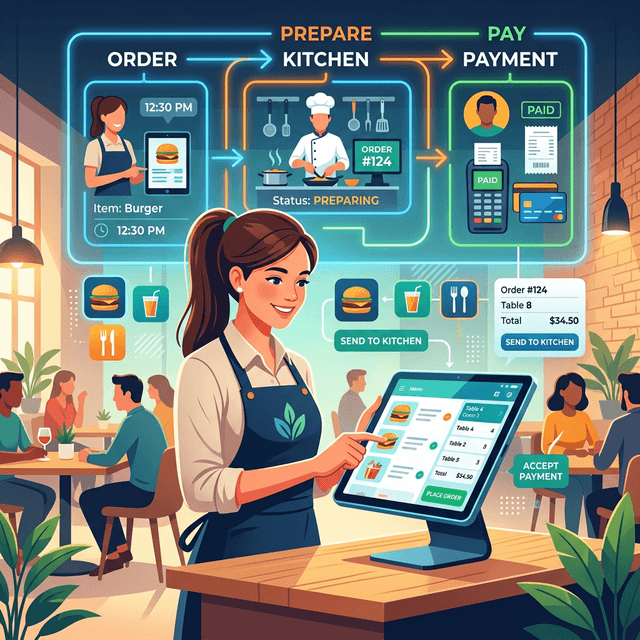
Restaurant billing software manages the complete transaction process inside a restaurant, from order entry to final payment. It connects order taking, kitchen preparation, billing, and reporting into a single operational workflow.
Understanding how restaurant billing software works helps restaurant owners improve operational efficiency and reduce manual errors.
Modern billing systems automate several tasks that were previously handled manually, such as calculating taxes, generating invoices, and recording sales data.
For a broader explanation of billing systems, see the restaurant billing software guide.
Order Entry
The first step in a restaurant billing system is capturing the customer's order.
Orders can be entered through several interfaces:
- POS terminals
- cashier billing systems
- handheld tablets
- QR ordering systems for restaurants
When an order is entered, the system records details such as:
- menu item
- quantity
- modifiers
- table number
This information becomes the basis of the billing transaction.
Order Processing
Once the order is entered, the billing system processes the data. The system performs several automatic actions:
- calculates item prices
- applies taxes
- applies discounts
- records the order under the table or order number
At the same time, the order is routed to the kitchen. Orders may be sent to:
- kitchen display systems
- kitchen printers
- station-specific preparation areas
This automation reduces communication errors between front-of-house and kitchen staff.
Bill Generation
When customers request the bill, the system consolidates all orders for that table or order.
The billing software then generates an invoice containing:
- itemized order list
- tax calculations
- service charges
- applied discounts
- final payable amount
The generated bill can be printed or displayed digitally.
Payment Processing
Restaurant billing systems support multiple payment methods. Common payment options include:
- cash
- debit cards
- credit cards
- digital wallets
- UPI payments
Many systems also allow split payments, where customers pay using multiple payment methods.
After payment is completed, the system records the transaction and closes the order.
Sales Recording and Reporting
Once the transaction is complete, the billing system stores the data in the restaurant’s sales records.
Managers can access this information through reports such as:
- daily revenue reports
- item sales reports
- peak hour analysis
- staff performance reports
These insights help restaurant managers understand operational performance.
Benefits of Restaurant Billing Automation
Restaurant billing software automates several operational tasks that would otherwise require manual work. By automatically calculating totals, applying taxes, and generating invoices, billing systems reduce human error and speed up checkout.
Automation also improves order accuracy because orders entered into the billing system are directly routed to kitchen displays or printers. This eliminates communication gaps between servers and kitchen staff.
Billing automation also provides real-time reporting, allowing restaurant managers to monitor sales, peak hours, and menu performance. These insights help restaurants improve operational efficiency and make better business decisions.
Types of Restaurant Billing Systems
Restaurants use different types of billing systems depending on their operational needs. Common types include:
Traditional billing systems
These systems run on local machines and operate within the restaurant network. They require local installation and hardware maintenance.
Cloud-based billing systems
Cloud billing platforms operate through internet-connected devices and allow restaurant managers to access reports remotely.
Integrated restaurant management platforms
Modern platforms combine billing, POS systems, QR ordering, and analytics into a single system. These platforms simplify restaurant operations by managing multiple functions through one interface.
Integration with Other Restaurant Systems
Modern restaurant billing software often integrates with other operational systems.
Common integrations include:
- restaurant POS systems
- QR ordering systems
- accounting software
- inventory management tools
These integrations allow restaurants to manage multiple operational functions within a connected technology environment.
Ready to upgrade your billing system?
Switch to Epitto's cloud-based billing and ERP platform.
Start Your Free Trialarrow_forwardExample of a Modern Billing Platform
Epitto is a cloud-based restaurant management platform that combines restaurant billing software, POS, QR ordering, and ERP-level reporting.
Integrated platforms like this allow restaurants to manage orders, payments, and reporting within a single system. Check out our restaurant ERP system for more details on enterprise-level management.
Instead of relying on multiple disconnected tools, restaurants can operate through one unified platform.
FAQ
What does restaurant billing software do?
Restaurant billing software generates invoices, processes payments, calculates taxes, and records sales transactions.
Can billing software send orders to the kitchen?
Yes. Most modern billing systems connect with kitchen display systems or kitchen printers to send orders automatically.
Can restaurant billing software work with QR ordering?
Yes. QR ordering systems can integrate with billing software to record orders and generate bills automatically.